


Check your package.json
NEW
| Version | Vulnerabilities | License Risk | |||
|---|---|---|---|---|---|
| 0.15.5 | | | 08/2016 | Popular
|
|
|
| 0.14.1 | | | 06/2016 |
|
| |
| 0.13.4 | | | 01/2016 |
|
| |
| 0.12.5 | | | 09/2015 |
|
| |
| 0.11.3 | | | 07/2015 |
|
| |
Scan your projects for vulnerabilities. Fix quickly with automated fixes. Get started with Snyk for free.
Get started freeThe npm package satellizer receives a total of 1,683 downloads a week. As such, we scored satellizer popularity level to be Recognized.
Based on project statistics from the GitHub repository for the npm package satellizer, we found that it has been starred 7,826 times.
Downloads are calculated as moving averages for a period of the last 12 months, excluding weekends and known missing data points.
This project has seen only 10 or less contributors.
We found a way for you to contribute to the project! Looks like satellizer is missing a Code of Conduct.
Further analysis of the maintenance status of satellizer based on released npm versions cadence, the repository activity, and other data points determined that its maintenance is Inactive.
An important project maintenance signal to consider for satellizer is that it hasn't seen any new versions released to npm in the past 12 months, and could be considered as a discontinued project, or that which receives low attention from its maintainers.
In the past month we didn't find any pull request activity or change in issues status has been detected for the GitHub repository.


satellizer has more than a single and default latest tag published for the npm package. This means, there may be other tags available for this package, such as next to indicate future releases, or stable to indicate stable releases.






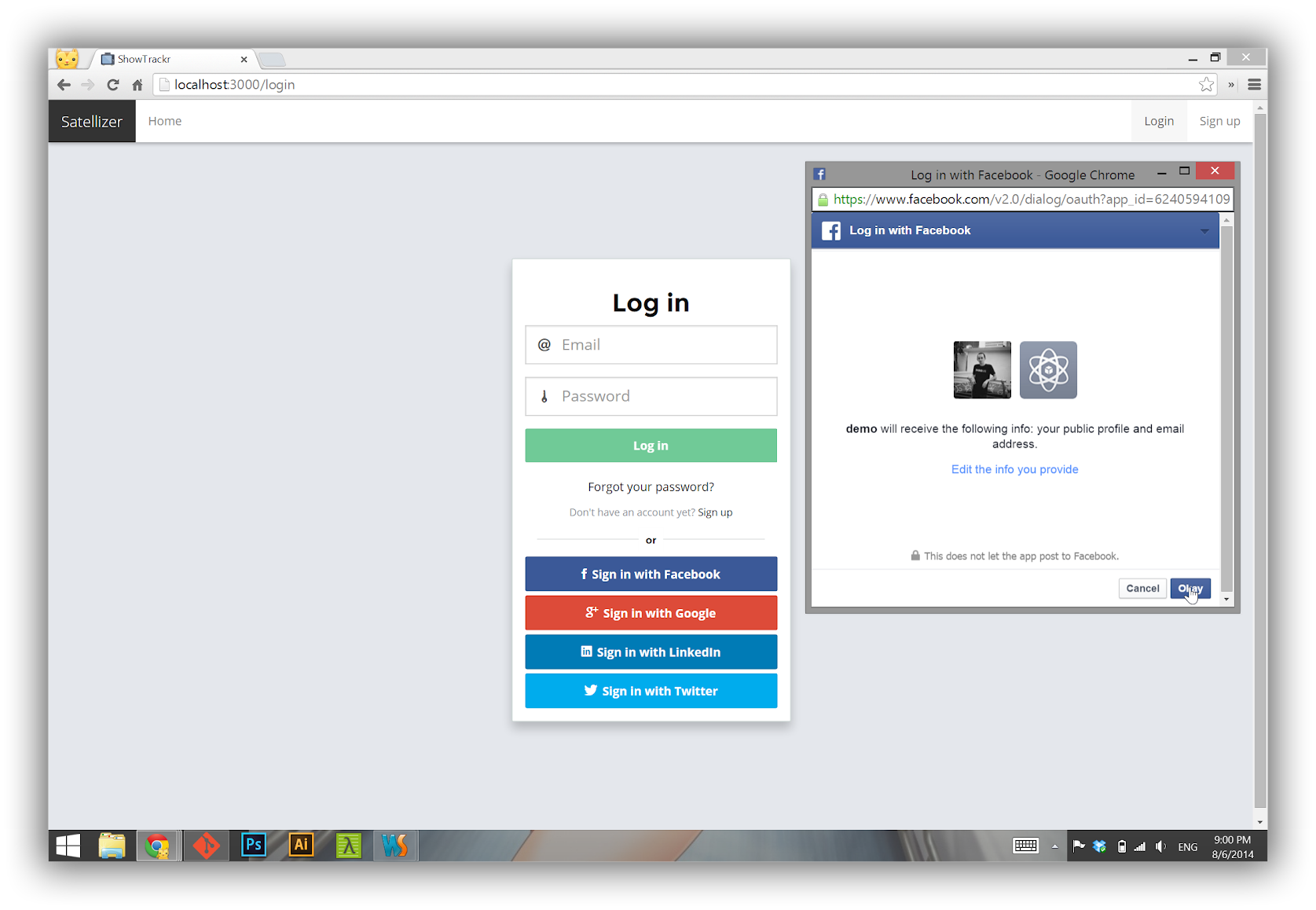
Satellizer is a simple to use, end-to-end, token-based authentication module for AngularJS with built-in support for Google, Facebook, LinkedIn, Twitter, Instagram, GitHub, Bitbucket, Yahoo, Twitch, Microsoft (Windows Live) OAuth providers, as well as Email and Password sign-in. However, you are not limited to the sign-in options above, in fact you can add any OAuth 1.0 or OAuth 2.0 provider by passing provider-specific information in the app config block.
Support us with a monthly donation and help us continue our activities. [Become a backer]


Become a sponsor and get your logo on our README on Github with a link to your site. [Become a sponsor]


 Browser
 NPM
NPM$ npm install satellizer
 Bower
Bower$ bower install satellizer
With any Cordova mobile apps or any framework that uses Cordova, such as Ionic Framework, you will need to add cordova-plugin-inappbrowser plugin:
$ cordova plugin add cordova-plugin-inappbrowser
Make sure that inAppBrowser is listed in your project:
$ cordova plugins
cordova-plugin-console 1.0.2 "Console"
cordova-plugin-device 1.1.1 "Device"
cordova-plugin-inappbrowser 1.3.0 "InAppBrowser"
cordova-plugin-splashscreen 3.2.0 "Splashscreen"
cordova-plugin-statusbar 2.1.1 "StatusBar"
cordova-plugin-whitelist 1.2.1 "Whitelist"
ionic-plugin-keyboard 1.0.8 "Keyboard"
Step 1. App Module
angular.module('MyApp', ['satellizer'])
  .config(function($authProvider) {

    $authProvider.facebook({
      clientId: 'Facebook App ID'
    });

    // Optional: For client-side use (Implicit Grant), set responseType to 'token' (default: 'code')
    $authProvider.facebook({
      clientId: 'Facebook App ID',
      responseType: 'token'
    });

    $authProvider.google({
      clientId: 'Google Client ID'
    });

    $authProvider.github({
      clientId: 'GitHub Client ID'
    });

    $authProvider.linkedin({
      clientId: 'LinkedIn Client ID'
    });

    $authProvider.instagram({
      clientId: 'Instagram Client ID'
    });

    $authProvider.yahoo({
      clientId: 'Yahoo Client ID / Consumer Key'
    });

    $authProvider.live({
      clientId: 'Microsoft Client ID'
    });

    $authProvider.twitch({
      clientId: 'Twitch Client ID'
    });

    $authProvider.bitbucket({
      clientId: 'Bitbucket Client ID'
    });

    $authProvider.spotify({
      clientId: 'Spotify Client ID'
    });

    // No additional setup required for Twitter

    $authProvider.oauth2({
      name: 'foursquare',
      url: '/auth/foursquare',
      clientId: 'Foursquare Client ID',
      redirectUri: window.location.origin,
      authorizationEndpoint: 'https://foursquare.com/oauth2/authenticate',
    });

  });
Step 2. Controller
angular.module('MyApp')
  .controller('LoginCtrl', function($scope, $auth) {

    $scope.authenticate = function(provider) {
      $auth.authenticate(provider);
    };

  });
Step 3. Template
<button>Sign in with Facebook</button>
<button>Sign in with Google</button>
<button>Sign in with GitHub</button>
<button>Sign in with LinkedIn</button>
<button>Sign in with Instagram</button>
<button>Sign in with Twitter</button>
<button>Sign in with Foursquare</button>
<button>Sign in with Yahoo</button>
<button>Sign in with Windows Live</button>
<button>Sign in with Twitch</button>
<button>Sign in with Bitbucket</button>
<button>Sign in with Spotify</button>
Note: For server-side usage please refer to the examples directory.
Below is a complete listing of all default configuration options.
$authProvider.httpInterceptor = function() { return true; },
$authProvider.withCredentials = false;
$authProvider.tokenRoot = null;
$authProvider.baseUrl = '/';
$authProvider.loginUrl = '/auth/login';
$authProvider.signupUrl = '/auth/signup';
$authProvider.unlinkUrl = '/auth/unlink/';
$authProvider.tokenName = 'token';
$authProvider.tokenPrefix = 'satellizer';
$authProvider.tokenHeader = 'Authorization';
$authProvider.tokenType = 'Bearer';
$authProvider.storageType = 'localStorage';

// Facebook
$authProvider.facebook({
  name: 'facebook',
  url: '/auth/facebook',
  authorizationEndpoint: 'https://www.facebook.com/v2.5/dialog/oauth',
  redirectUri: window.location.origin + '/',
  requiredUrlParams: ['display', 'scope'],
  scope: ['email'],
  scopeDelimiter: ',',
  display: 'popup',
  oauthType: '2.0',
  popupOptions: { width: 580, height: 400 }
});

// Google
$authProvider.google({
  url: '/auth/google',
  authorizationEndpoint: 'https://accounts.google.com/o/oauth2/auth',
  redirectUri: window.location.origin,
  requiredUrlParams: ['scope'],
  optionalUrlParams: ['display'],
  scope: ['profile', 'email'],
  scopePrefix: 'openid',
  scopeDelimiter: ' ',
  display: 'popup',
  oauthType: '2.0',
  popupOptions: { width: 452, height: 633 }
});

// GitHub
$authProvider.github({
  url: '/auth/github',
  authorizationEndpoint: 'https://github.com/login/oauth/authorize',
  redirectUri: window.location.origin,
  optionalUrlParams: ['scope'],
  scope: ['user:email'],
  scopeDelimiter: ' ',
  oauthType: '2.0',
  popupOptions: { width: 1020, height: 618 }
});

// Instagram
$authProvider.instagram({
  name: 'instagram',
  url: '/auth/instagram',
  authorizationEndpoint: 'https://api.instagram.com/oauth/authorize',
  redirectUri: window.location.origin,
  requiredUrlParams: ['scope'],
  scope: ['basic'],
  scopeDelimiter: '+',
  oauthType: '2.0'
});

// LinkedIn
$authProvider.linkedin({
  url: '/auth/linkedin',
  authorizationEndpoint: 'https://www.linkedin.com/uas/oauth2/authorization',
  redirectUri: window.location.origin,
  requiredUrlParams: ['state'],
  scope: ['r_emailaddress'],
  scopeDelimiter: ' ',
  state: 'STATE',
  oauthType: '2.0',
  popupOptions: { width: 527, height: 582 }
});

// Twitter
$authProvider.twitter({
  url: '/auth/twitter',
  authorizationEndpoint: 'https://api.twitter.com/oauth/authenticate',
  redirectUri: window.location.origin,
  oauthType: '1.0',
  popupOptions: { width: 495, height: 645 }
});

// Twitch
$authProvider.twitch({
  url: '/auth/twitch',
  authorizationEndpoint: 'https://api.twitch.tv/kraken/oauth2/authorize',
  redirectUri: window.location.origin,
  requiredUrlParams: ['scope'],
  scope: ['user_read'],
  scopeDelimiter: ' ',
  display: 'popup',
  oauthType: '2.0',
  popupOptions: { width: 500, height: 560 }
});

// Windows Live
$authProvider.live({
  url: '/auth/live',
  authorizationEndpoint: 'https://login.live.com/oauth20_authorize.srf',
  redirectUri: window.location.origin,
  requiredUrlParams: ['display', 'scope'],
  scope: ['wl.emails'],
  scopeDelimiter: ' ',
  display: 'popup',
  oauthType: '2.0',
  popupOptions: { width: 500, height: 560 }
});

// Yahoo
$authProvider.yahoo({
  url: '/auth/yahoo',
  authorizationEndpoint: 'https://api.login.yahoo.com/oauth2/request_auth',
  redirectUri: window.location.origin,
  scope: [],
  scopeDelimiter: ',',
  oauthType: '2.0',
  popupOptions: { width: 559, height: 519 }
});

// Bitbucket
$authProvider.bitbucket({
  url: '/auth/bitbucket',
  authorizationEndpoint: 'https://bitbucket.org/site/oauth2/authorize',
  redirectUri: window.location.origin + '/',
  optionalUrlParams: ['scope'],
  scope: ['email'],
  scopeDelimiter: ' ',
  oauthType: '2.0',
  popupOptions: { width: 1020, height: 618 }
});

// Spotify
$authProvider.spotify({
  url: '/auth/spotify',
  authorizationEndpoint: 'https://accounts.spotify.com/authorize',
  redirectUri: window.location.origin,
  optionalUrlParams: ['state'],
  requiredUrlParams: ['scope'],
  scope: ['user-read-email'],
  scopePrefix: '',
  scopeDelimiter: ',',
  oauthType: '2.0',
  popupOptions: { width: 500, height: 530 }
});

// Generic OAuth 2.0
$authProvider.oauth2({
  name: null,
  url: null,
  clientId: null,
  redirectUri: null,
  authorizationEndpoint: null,
  defaultUrlParams: ['response_type', 'client_id', 'redirect_uri'],
  requiredUrlParams: null,
  optionalUrlParams: null,
  scope: null,
  scopePrefix: null,
  scopeDelimiter: null,
  state: null,
  oauthType: null,
  popupOptions: null,
  responseType: 'code',
  responseParams: {
    code: 'code',
    clientId: 'clientId',
    redirectUri: 'redirectUri'
  }
});

// Generic OAuth 1.0
$authProvider.oauth1({
  name: null,
  url: null,
  authorizationEndpoint: null,
  redirectUri: null,
  oauthType: null,
  popupOptions: null
});
 |
 |
 |
 |
 |
 |
| 9+ | ✓ | ✓ | ✓ | ✓ | ✓ |
Satellizer relies on token-based authentication using JSON Web Tokens instead of cookies.
Additionally, authorization (obtaining user's information with their permission) and authentication (application sign-in) requires sever-side implementation. See provided examples implemented in multiple languages for your convenience. In other words, you cannot just launch your AngularJS application and expect everything to work. The only exception is when you use OAuth 2.0 Implicit Grant (client-side) authorization by setting responseType: 'token' in provider's configuration.
 Login with Email and Password
 Client: Enter your email and password into the login form. Client: On form submit call
 $auth.login() with email and password. Client: Send a POST request to /auth/login. Server: Check if email exists, if not - return
 401. Server: Check if password is correct, if not - return 401. Server: Create a JSON Web Token and send it back to the client. Client: Parse the token and save it to Local Storage for subsequent
use after page reload. Login with OAuth 1.0 Client: Open an empty popup window via
 $auth.authenticate('provider name'). Client: Unlike OAuth 2.0, with OAuth 1.0 you cannot go directly to the authorization
screen without a valid request_token. Client: The OAuth 1.0 flow starts with an empty POST request to /auth/provider. Server: Obtain and return request_tokenfor the authorization popup. Client: Set the URL location of a popup to the authorizationEndpoint with a valid request_token query parameter, as well as popup options for height and width. This will redirect a user to the authorization screen. After this point, the flow is very similar to OAuth 2.0. Client: Sign in with your username and password if necessary, then authorize
the application. Client: Send a POST request back to the /auth/provider with
oauth_token and oauth_verifier query parameters. Server: Do an OAuth-signed POST request to the /access_token URL since we now have oauth_token and
oauth_verifier parameters. Server: Look up the user by their unique Provider ID. If user already
exists, grab the existing user, otherwise create a new user account. Server: Create a JSON Web Token and send it back to the client. Client: Parse the token and save it to Local Storage for subsequent
use after page reload. Login with OAuth 2.0 Client: Open a popup window via
 $auth.authenticate('provider name'). Client: Sign in with that provider, if necessary, then authorize the application. Client: After successful authorization, the popup is redirected back to
your app, e.g. https://localhost:3000, with the code (authorization code)
query string parameter. Client: The code parameter is sent back to the parent window that opened the popup. Client: Parent window closes the popup and sends a POST
request to /auth/provider withcode parameter. Server: Authorization code is exchanged for access token. Server: User information is retrived using the access token from Step 6. Server: Look up the user by their unique Provider ID. If user already
exists, grab the existing user, otherwise create a new user account. Server: In both cases of Step 8, create a JSON Web Token and send it back to the client. Client: Parse the token and save it to Local Storage for subsequent
use after page reload. Log out Client: Remove token from Local Storage.
Note: To learn more about JSON Web Tokens visit  JWT.io.
Note: Make sure you have turned on Contacts API and Google+ API in the APIs tab.
 - Visit [Facebook Developers](https://developers.facebook.com/)
- Click **Apps > Create a New App** in the navigation bar
- Enter *Display Name*, then choose a category, then click **Create app**
- Click on *Settings* on the sidebar, then click **+ Add Platform**
- Select **Website**
- Enter *https://localhost:3000* for *Site URL*
- Visit [Facebook Developers](https://developers.facebook.com/)
- Click **Apps > Create a New App** in the navigation bar
- Enter *Display Name*, then choose a category, then click **Create app**
- Click on *Settings* on the sidebar, then click **+ Add Platform**
- Select **Website**
- Enter *https://localhost:3000* for *Site URL*
 - Sign in at [https://apps.twitter.com](https://apps.twitter.com/)
- Click on **Create New App**
- Enter your *Application Name*, *Description* and *Website*
- For **Callback URL**: *https://127.0.0.1:3000*
- Go to **Settings** tab
- Under *Application Type* select **Read and Write** access
- Check the box **Allow this application to be used to Sign in with Twitter**
- Click **Update this Twitter's applications settings**
- Sign in at [https://apps.twitter.com](https://apps.twitter.com/)
- Click on **Create New App**
- Enter your *Application Name*, *Description* and *Website*
- For **Callback URL**: *https://127.0.0.1:3000*
- Go to **Settings** tab
- Under *Application Type* select **Read and Write** access
- Check the box **Allow this application to be used to Sign in with Twitter**
- Click **Update this Twitter's applications settings**
 - Visit [Live Connect App Management](https://go.microsoft.com/fwlink/p/?LinkId=193157).
- Click on **Create application**
- Enter an *Application name*, then click on **I accept** button
- Go to **API Settings** tab
- Enter a *Redirect URL*
- Click **Save**
- Go to **App Settings** tab to get *Client ID* and *Client Secret*
- Visit [Live Connect App Management](https://go.microsoft.com/fwlink/p/?LinkId=193157).
- Click on **Create application**
- Enter an *Application name*, then click on **I accept** button
- Go to **API Settings** tab
- Enter a *Redirect URL*
- Click **Save**
- Go to **App Settings** tab to get *Client ID* and *Client Secret*
> Note: Microsoft does not consider localhost or 127.0.0.1 to be a valid URL.
As a workaround for local development add 127.0.0.1 mylocalwebsite.net to /etc/hosts file
and specify mylocalwebsite.net as your Redirect URL in the API Settings tab.
 - Visit
[https://developer.spotify.com](https://developer.spotify.com)
- Select **My Apps** on the top menu
- Select **Create an App** on the right side
- **Application Name**: Your app name
- **Application Description**: Your app Description
- Click **Create**
- Fill out the following:
- **Redirect URIs**: *https://localhost:3000*
- Click **Save**
- Visit
[https://developer.spotify.com](https://developer.spotify.com)
- Select **My Apps** on the top menu
- Select **Create an App** on the right side
- **Application Name**: Your app name
- **Application Description**: Your app Description
- Click **Create**
- Fill out the following:
- **Redirect URIs**: *https://localhost:3000*
- Click **Save**
$auth.login(user, [options])$auth.signup(user, [options])$auth.authenticate(name, [userData])$auth.logout()$auth.isAuthenticated()$auth.link(name, [userData])$auth.unlink(name, [options])$auth.getToken()$auth.getPayload()$auth.setToken(token)$auth.removeToken()$auth.setStorageType(type)$auth.login(user, [options])Sign in using Email and Password.
| Param | Type | Details |
|---|---|---|
| user | Object |
JavaScript object containing user information. |
| options (optional) | Object |
HTTP config object. See $http(config) docs. |
var user = {
  email: $scope.email,
  password: $scope.password
};

$auth.login(user)
  .then(function(response) {
    // Redirect user here after a successful log in.
  })
  .catch(function(response) {
    // Handle errors here, such as displaying a notification
    // for invalid email and/or password.
  });
$auth.signup(user, [options])Create a new account with Email and Password.
| Param | Type | Details |
|---|---|---|
| user | Object |
JavaScript object containing user information. |
| options (optional) | Object |
HTTP config object. See $http(config) docs. |
var user = {
  firstName: $scope.firstName,
  lastName: $scope.lastName,
  email: $scope.email,
  password: $scope.password
};

$auth.signup(user)
  .then(function(response) {
    // Redirect user here to login page or perhaps some other intermediate page
    // that requires email address verification before any other part of the site
    // can be accessed.
  })
  .catch(function(response) {
    // Handle errors here.
  });
$auth.authenticate(name, [userData])Starts the OAuth 1.0 or the OAuth 2.0 authorization flow by opening a popup window. If used client side, responseType: "token" is required in the provider setup to get the actual access token.
| Param | Type | Details |
|---|---|---|
| name | String |
One of the built-in or custom OAuth provider names created via $authProvider.oauth1() or $authProvider.oauth2(). |
| userData (optional) | Object |
If you need to send additional data to the server along with code, clientId and redirectUri (OAuth 2.0) or oauth_token and oauth_verifier (OAuth 1.0). |
$auth.authenticate('google')
  .then(function(response) {
    // Signed in with Google.
  })
  .catch(function(response) {
    // Something went wrong.
  });
$auth.logout()Deletes a token from Local Storage (or Session Storage).
$auth.logout();
$auth.isAuthenticated()Checks authentication status of a user.
| State | True | False |
|---|---|---|
| No token in Local Storage | ✓ | |
| Token present, but not a valid JWT | ✓ | |
JWT present without exp |
✓ | |
JWT present with exp and not expired |
✓ | |
JWT present with exp and expired |
✓ |
// Controller
$scope.isAuthenticated = function() {
  return $auth.isAuthenticated();
};
<ul>
  <li><a href="/login">Login</a></li>
  <li><a href="/signup">Sign up</a></li>
</ul>
<ul>
  <li><a href="/logout">Logout</a></li>
</ul>
$auth.link(name, [userData])Alias for $auth.authenticate(name, [userData]).
💡 Note: Account linking (and merging) business logic is handled entirely on the server.
// Controller
$scope.link = function(provider) {
  $auth.link(provider)
    .then(function(response) {
      // You have successfully linked an account.
    })
    .catch(function(response) {
      // Handle errors here.
    });
};
<button>
  Connect Facebook Account
</button>
$auth.unlink(name, [options])Unlinks an OAuth provider.
By default, sends a POST request to /auth/unlink with the { provider: name } data object.
| Param | Type | Details |
|---|---|---|
| name | String |
One of the built-in or custom OAuth provider names created via $authProvider.oauth1() or $authProvider.oauth2(). |
| options (optional) | Object |
HTTP config object. See $http(config) docs. |
$auth.unlink('github')
  .then(function(response) {
    // You have unlinked a GitHub account.
  })
  .catch(function(response) {
    // Handle errors here.
  });
$auth.getToken()Returns a token from Local Storage (or Session Storage).
$auth.getToken();
// eyJhbGciOiJIUzI1NiIsInR5cCI6IkpXVCJ9.eyJzdWIiOjEyMzQ1Njc4OTAsIm5hbWUiOiJKb2huIERvZSJ9.kRkUHzvZMWXjgB4zkO3d6P1imkdp0ogebLuxnTCiYUU
$auth.getPayload()Returns a JWT Claims Set, i.e. the middle part of a JSON Web Token.
$auth.getPayload();
// { exp: 1414978281, iat: 1413765081, userId: "544457a3eb129ee822a38fdd" }
$auth.setToken(token)Saves a JWT or an access token to Local Storage / Session Storage.
| Param | Type | Details |
|---|---|---|
| token | Object |
An object that takes a JWT (response.data[config.tokenName]) or an access token (response.access_token). |
$auth.removeToken()Removes a token from Local Storage / Session Storage. Used internally by $auth.logout().
$auth.removeToken();
$auth.setStorageType(type)Sets storage type to Local Storage or Session Storage.
| Param | Type | Details |
|---|---|---|
| type | String |
Accepts 'localStorage' and 'sessionStorage' values. |
$auth.setStorageType('sessionStorage');
offline_access?$authProvider.google({
optionalUrlParams: ['access_type'],
accessType: 'offline'
});
redirectUri to something other than base URL?By default, redirectUri is set to window.location.origin (protocol, hostname, port number of a URL) for all OAuth providers. This redirectUri must match exactly the URL¹ specified in your OAuth app settings.
Facebook (example)

However, you can set redirectUri to any URL path you desire. For instance, you may follow the naming convention of Passport.js:
// Note: Must be absolute path.
window.location.origin + '/auth/facebook/facebook/callback'
window.location.origin + '/auth/facebook/google/callback'
...
Using the example above, a popup window will be redirected to https://localhost:3000/auth/facebook/callback?code=YOUR_AUTHORIZATION_CODE after a successful Facebook authorization. To avoid potential 404 errors, create server routes for each redirectUri URL that return 200 OK. Or alternatively, you may render a custom template with a loading spinner. For the moment, a popup will not stay long enough to see that custom template, due to 20ms interval polling, but in the future I may add support for overriding this polling interval value.
As far as Satellizer is concerned, it does not matter what is the value of redirectUri as long as it matches URL in your OAuth app settings. Satellizer's primary concern is to read URL query/hash parameters, then close a popup.
¹ Note: Depending on the OAuth provider, it may be called Site URL, Callback URL, Redirect URL, and so on.
Authorization: Bearer ?If you are unable to send a token to your server in the following format - Authorization: Bearer , then use
$authProvider.tokenHeader and $authProvider.tokenType config options to change the header format. The default values are Authorization and Bearer, respectively.
For example, if you need to use Authorization: Basic header, this is where you change it.
By default, once user is authenticated, JWT will be sent on every request. If you would like to prevent that, you could use skipAuthorization option in your $http request. For example:
$http({
  method: 'GET',
  url: '/api/endpoint',
  skipAuthorization: true  // `Authorization: Bearer ` will not be sent on this request.
});
localStorage to sessionStorage?Yes, you can toggle between localStorage and sessionStorage via the following Satellizer methods:
$auth.setStorageType('sessionStorage');$auth.setStorageType('localStorage');First, check what kind of error you are getting by opening the Web Inspector from Develop > Simulator > index.html menu. If you have configured everything correctly, chances are you running into the following error:
> Failed to load resource: The resource could not be loaded because the App Transport Security policy requires the use of a secure connection.
Follow instructions on this StackOverflow post by adding NSAppTransportSecurity to info.plist. That should fix the problem.
| Contribution | User |
|---|---|
| Dropwizard (Java) Example | Alice Chen |
| Go Example | Salim Alami |
| Ruby on Rails Example | Simonas Gildutis |
| Ionic Framework Example | Dimitris Bozelos |
Additionally, I would like to thank all other contributors who have reported bugs, submitted pull requests and suggested new features!
The MIT License (MIT)
Copyright (c) 2016 Sahat Yalkabov
Permission is hereby granted, free of charge, to any person obtaining a copy of this software and associated documentation files (the "Software"), to deal in the Software without restriction, including without limitation the rights to use, copy, modify, merge, publish, distribute, sublicense, and/or sell copies of the Software, and to permit persons to whom the Software is furnished to do so, subject to the following conditions:
The above copyright notice and this permission notice shall be included in all copies or substantial portions of the Software.
THE SOFTWARE IS PROVIDED "AS IS", WITHOUT WARRANTY OF ANY KIND, EXPRESS OR IMPLIED, INCLUDING BUT NOT LIMITED TO THE WARRANTIES OF MERCHANTABILITY, FITNESS FOR A PARTICULAR PURPOSE AND NONINFRINGEMENT. IN NO EVENT SHALL THE AUTHORS OR COPYRIGHT HOLDERS BE LIABLE FOR ANY CLAIM, DAMAGES OR OTHER LIABILITY, WHETHER IN AN ACTION OF CONTRACT, TORT OR OTHERWISE, ARISING FROM, OUT OF OR IN CONNECTION WITH THE SOFTWARE OR THE USE OR OTHER DEALINGS IN THE SOFTWARE.
Token-based AngularJS Authentication. Visit Snyk Advisor to see a full health score report for satellizer, including popularity, security, maintenance & community analysis.
The npm package satellizer receives a total of 1,683 weekly downloads. As such, satellizer popularity was classified as a recognized. Visit the popularity section on Snyk Advisor to see the full health analysis.
We found indications that satellizer is an Inactive project. See the full package health analysis to learn more about the package maintenance status.
The npm package satellizer was scanned for known vulnerabilities and missing license, and no issues were found. Thus the package was deemed as safe to use. See the full health analysis review.

Minimize your risk by selecting secure & well maintained open source packages

Scan your application to find vulnerabilities in your: source code, open source dependencies, containers and configuration files
Easily fix your code by leveraging automatically generated PRs
New vulnerabilities are discovered every day. Get notified if your application is affected